
3D Render Upscaler — Upscale Renders to 4K, No Warped Lines
Upscale SketchUp, Blender, V-Ray, and CAD renders to 4K (2× or 4×) without warping straight mullions or floor-plan lines.
- Default Mode: Precision · 3D & Architecture
- Engines: Topaz Precision & Kie Crisp
- Scale: 2× (2 Cr) / 4× (4 Cr)
- Updated: 2026-11-27
Drop image here, paste, or browse
JPG, PNG, WebP · Oversized photos auto-fit to 2048 px
Sign in with Google & credits required. Uploads auto-delete from site storage in 24h.
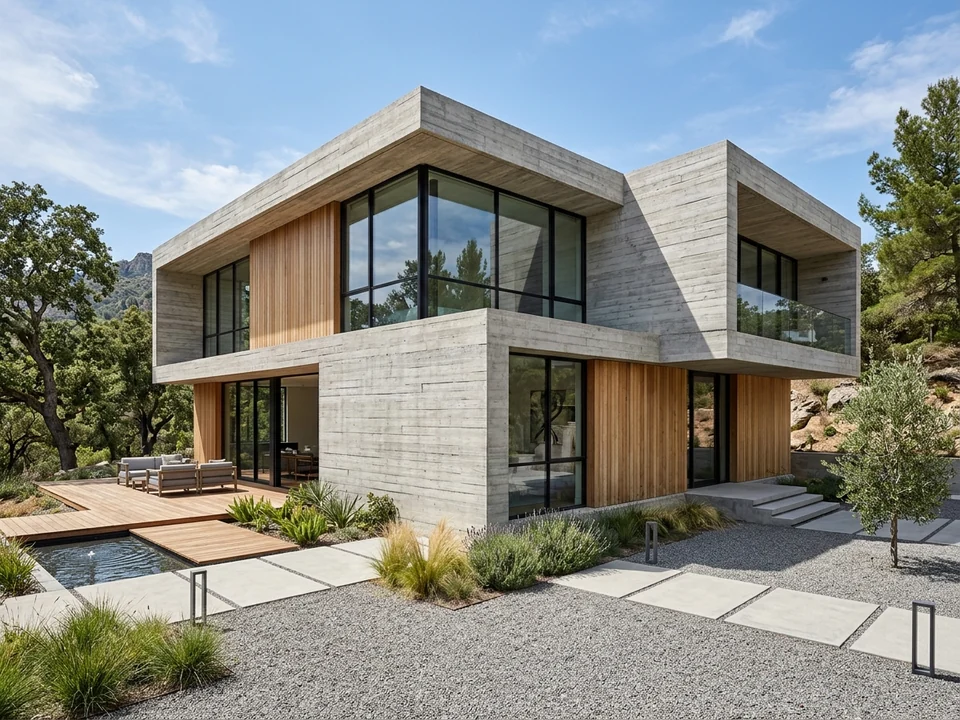
From Fast Viewport Draft to Client-Ready 4K Board
Keep perspective lines, glass reflections, and timber siding razor-sharp without waiting hours for native 4K path-tracing passes.
- Preserves orthographic lines, glass frames, and shadow edges
- Supports JPG, PNG, and WebP up to 2048 px input edge
- Commercial client usage included across all packs and plans
Interactive 3D render comparison (960×720). Upload your own render above to upscale renders to 4K.
Upscaling SketchUp and Blender Renders to 4K
Rendering native 4K or 8K stills locally in SketchUp, Blender Cycles, V-Ray, Twinmotion, or Enscape takes hours of GPU compute per camera angle. Architects and visualization studios routinely export fast 1080p or 1440p viewport drafts for client reviews—then run them through Precision mode in our 4K AI Upscaler to upscale renders to 4K in seconds without repainting the scene.
Creative diffusion upscalers bend straight steel window mullions, morph pendant lights into unintended shapes, smear board-formed concrete seams, and garble room labels. 3D Render Upscaler avoids those failures by routing every render through dedicated non-generative engines (Topaz Precision and Kie Crisp) that keep structural geometry locked.
Two Precision Engines Tuned for Architectural Workflows
- Topaz Precision (
precision-2x/precision-4x): Best for exterior concrete villas, timber cladding, natural stone, foliage edges, and interior global-illumination renders. Sharpens material grain while locking vanishing points. - Kie Crisp Text-Safe (
crisp-2x/crisp-4x): Best when architectural sheets include room callouts, scale bars, CAD dimensions, UI overlays, or thin orthographic linework that must stay legible at 4K.
Recommended 3D Visualization Pipeline & Privacy
- Export a clean 1200–2048 px
JPGorPNGpass from SketchUp, Blender, Lumion, or Rhino without heavy post-sharpening. - Keep Precision · 3D & Arch selected above, pick 2× (2 credits) for pitch decks or 4× (4 credits) for competition boards, and choose Topaz or Kie Crisp.
- Check curtain-wall corners and shadow edges with the 1.85× Loupe before downloading your 4K PNG.
- Confidentiality & Pricing: Uploaded WIP renders delete automatically from
4kaiupscaler.comstorage within 24 hours (Privacy Policy). Google sign-in and credits are required—choose non-expiring $7.90 / $19.90 packs or Pro ($9.90/mo) and Studio ($19.90/mo) plans on Pricing. Need PBR material maps or people shots? Explore Texture & Product Upscaler and 4K AI Portrait Upscaler.
3D Render Upscaler FAQ
Can I upscale a 3D render to 4K?
Yes. Upload a 1080p or 1440p render from SketchUp, Blender, V-Ray, Enscape, or CAD, choose 2× (2 credits) or 4× (4 credits) in Precision mode, and download a crisp 4K render with straight architectural lines preserved.
Will 3D Render Upscaler warp straight lines or add furniture?
No. Precision mode uses non-generative Topaz and Kie Crisp upscaling models rather than creative diffusion, so straight mullions, concrete joints, cabinets, and lighting fixtures keep their original geometry.
Should I use Topaz or Kie Crisp for SketchUp and Blender exports?
Pick Topaz for photoreal architectural materials like concrete, wood, stone, and foliage. Pick Kie Crisp when your board contains CAD room labels, numbers, or UI overlays.
Are confidential client renders deleted after upscaling?
Uploaded renders delete automatically from site storage within 24 hours, and finished files remain in your /account history for 30 days.